
|
Management setting ·
Text messaging is available in the U.S. and Canada. For international texting, contact the TSD Sales Team by emailing sales@tsdweb.com.
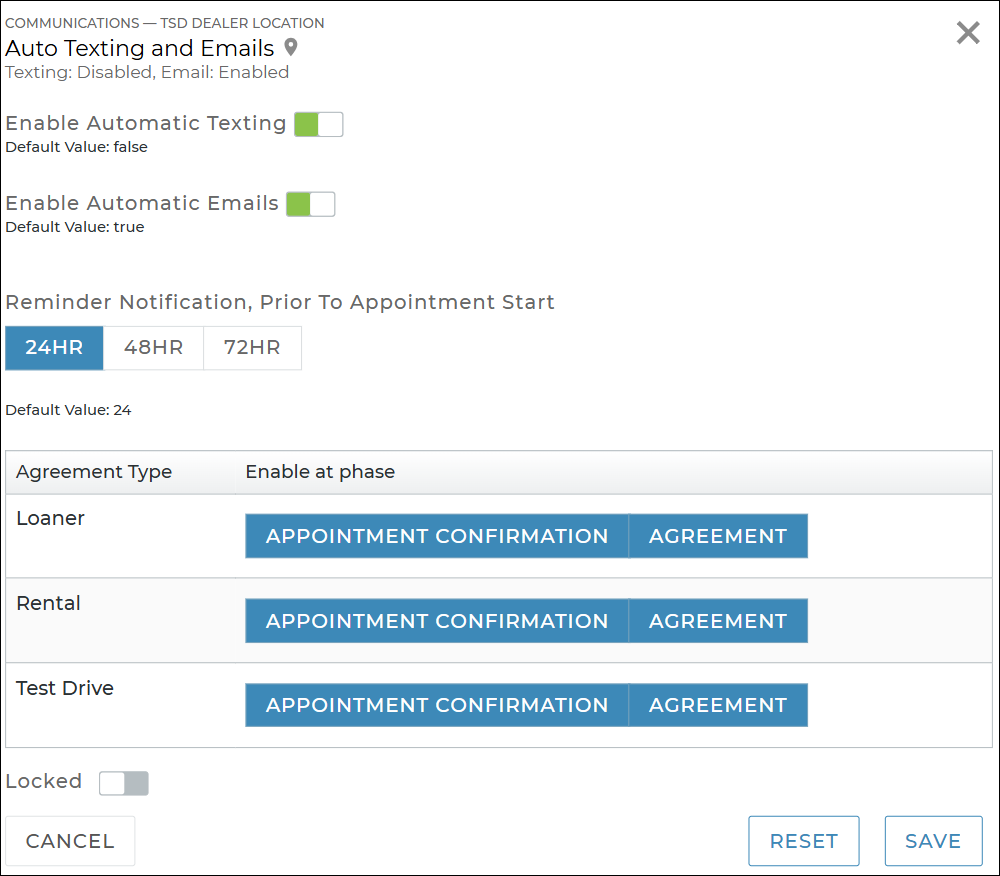
Use this setting to turn on automatic texting and/or emailing on different types of appointments and agreements. See "Automatic Texting and Emailing" for more information, including additional setup options and how it works on appointments and agreements.
Hover to view the full-sized image.
Note: Any changes you make to this setting only affect new appointments and agreements, going forward, and do not affect texts or emails scheduled to be sent on existing appointments and agreements.
- Choose the method(s) of communication you want available. Toggle on Enable Automatic Texting for texts and/or Enable Automatic Emails for emails.
- Choose when the follow-up reminder message is sent. For appointment confirmations, an additional reminder text and/or email will be sent to the customer 24 hours (default), 48 hours, or 72 hours prior to the appointment's checkout date, based on your selection; the only exception is when an appointment is booked for later the same day.
- Choose when you want these messages triggered. The following options are available for each of your location's Agreement Types:
- Appointment Confirmation: Sent when a new appointment is created (booked).
- Agreement: Sent when an agreement is opened and closed on web or mobile. The message contains the signed or unsigned agreement form PDF as a link (in text) or attachment (in email).
© 2026 TSD Rental, LLC